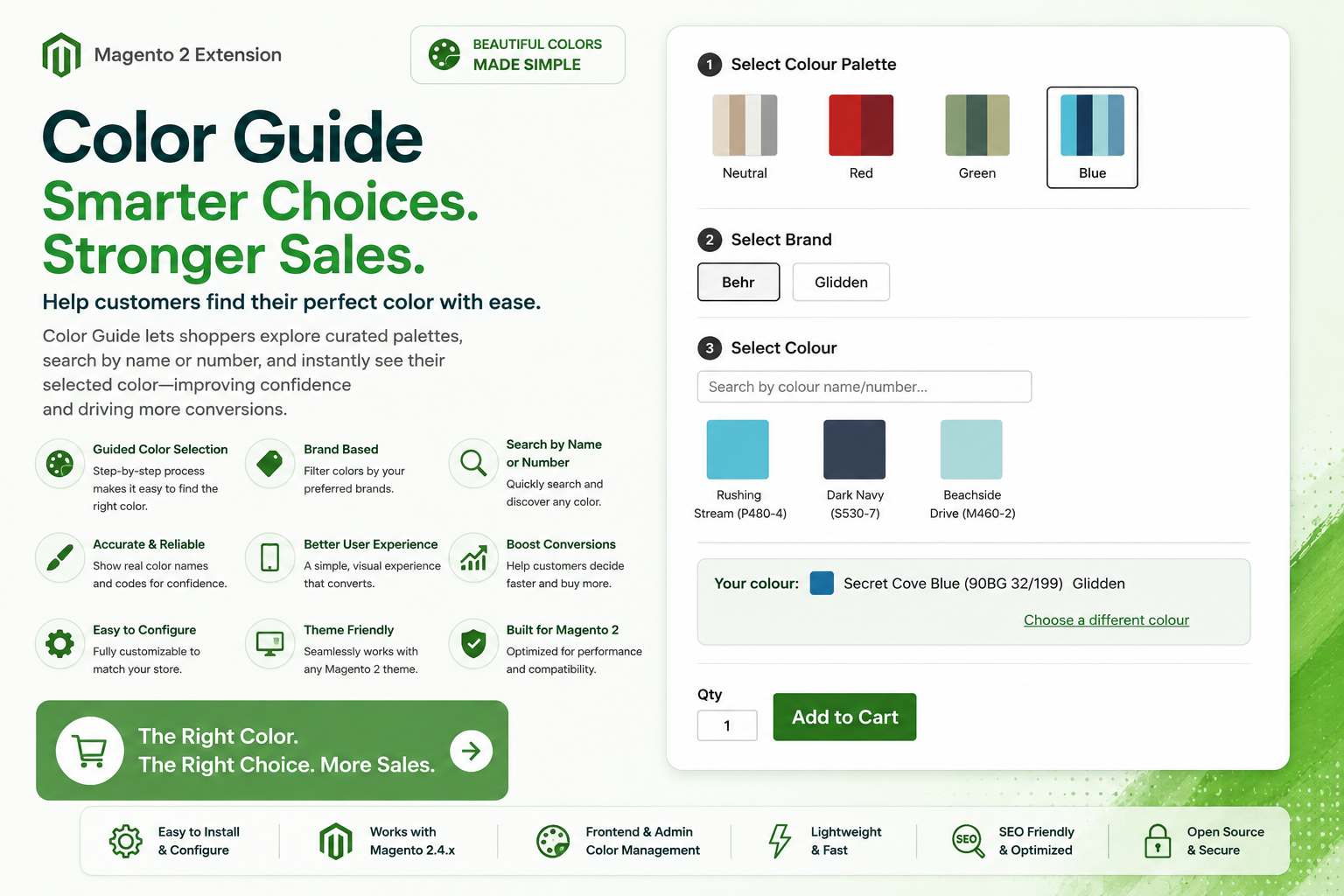
Ayasoftware Colorguide lets you sell products with a huge number of option combinations — every brand × colour × size pairing — without the performance cost of building that out as native Magento custom options. Instead of storing thousands of option/value rows per product, brands, colours, and prices are managed once as shared, lightweight admin data and looked up on demand, so catalog size and page performance do not degrade as the number of combinations grows.
Key Features
- Built for Scale — Brands, colours, and prices live in their own compact admin tables instead of per-product custom options, so adding thousands of combinations does not bloat product data or slow down saves and reindexing.
- Fast Swatch Picker — A searchable, swatch-based colour picker grouped by brand, with hex-colour or uploaded swatch-image previews, rendered without the overhead of native custom-option markup.
- Live Price Lookup — Selecting a colour and size fires a single lightweight request for that combination's price and updates the displayed price immediately, instead of shipping every possible price up front.
- Admin-Managed Brands, Colours & Prices — Manage brands, individual colours (hex value or uploaded swatch image), and brand/size pricing from Magento admin grids.
- Custom Colour Code Requests — Shoppers can request a custom colour code outside the standard list, priced as a configurable surcharge over the product's base price.
- Cart & Order Visibility — The selected colour appears as a line-item option on the cart, order, and reorder screens.
Admin Configuration
Manage brands, colours, and prices from Stores → Colorguide in the Magento admin: add brands, upload or set a hex value for each colour, and configure the price for each brand/size combination.
Stack Requirements
Stack Requirements — ayasoftware/module-colorguide v1.1.0
Core Platform
| Dependency | Version | Notes |
|---|---|---|
| Magento Open Source / Adobe Commerce | 2.4.x | |
| PHP | 8.1+ | Required by Magento framework |
PHP Composer Dependencies
| Package | Version | Purpose |
|---|---|---|
magento/framework | >=103.0 | Magento 2.4.x framework |
magento/module-backend | * | Admin grids and forms |
magento/module-sales | * | Order-level colour option display |
magento/module-quote | * | Cart pricing |
magento/module-checkout | * | Add-to-cart / update-cart-item integration |
magento/module-cms | * | Admin menu integration |
magento/module-catalog | * | Product page integration |
Installation Checklist
Magento Open Source / Adobe Commerce 2.4.x
PHP 8.1+
Composer dependencies installed automatically via composer require ayasoftware/module-colorguide
Note: Designed for simple and configurable products where colour is priced per brand/size. Run bin/magento setup:upgrade after installing to create the brand/colour/price admin tables.
Changelog
1.3.0 August 12, 2026
New
- Import/Export page (Stores > Color Guide > Import / Export) lets you upload a single CSV to create or update paint brands, colours, and prices in one go. Existing rows are matched by brand + colour name (for colours) or brand + container size (for prices) and updated in place; new combinations are added automatically. Nothing is ever deleted by an import.
- Export button downloads all current brand/colour/price data as a CSV in the same format the importer reads, so you can edit it in a spreadsheet and re-upload.
- Download Sample Template button provides a ready-to-fill starter CSV showing the expected columns.
Run bin/magento setup:upgrade and bin/magento setup:di:compile after updating.
1.2.1 August 11, 2026
New
- Ships a ready-made Container Size attribute (Text Swatch), pre-seeded with two starter options, so a fresh install has a working configurable-size attribute out of the box
- Mass delete added to the Brands, Colours, and Prices admin grids
Fixes
- The Price grid's Container Size dropdown and column previously referenced a nonexistent attribute code and always rendered empty or crashed in production mode
- The single-row "Delete" confirmation dialog on the Brands, Colours, and Prices grids showed a raw unresolved template string instead of the record's name
Run bin/magento setup:upgrade and bin/magento setup:di:compile after updating.
1.2.0 August 11, 2026
New
- Redesigned colour-selection experience: a guided step-by-step wizard (Colour Palette -> Brand -> Colour -> Container Size) makes finding and configuring a paint colour faster and easier.
- Colours can now be grouped into palette families (e.g. Neutral, Red, Green, Blue) for quicker browsing.
Improvements
- The selected brand is now shown alongside colour and size in the cart and order summary.
- Improved alignment of the quantity field and Add to Cart button.
Compatibility
- Fixed a compatibility issue that could prevent the colour guide admin grids from loading correctly in certain production environments.
1.1.0 August 10, 2026
Security
- Fixed a price-manipulation issue where cart pricing for colour/size selections could be influenced by a client-submitted value instead of the admin-configured price table; pricing is now always re-derived server-side from Brand/Colour/Price data.
- Scoped admin permissions for all Colorguide admin screens (brands, colours, prices) to a dedicated ACL resource, so access can be restricted per admin role like any other Magento admin section.
- Removed an overly broad internal flag that was being set on every add-to-cart action storefront-wide instead of only Colorguide-priced items.
Improvements
- Confirmed compatibility with PHP 8.1+ and Magento 2.4.x.
- Fixed an edge case where selecting a colour/size combination with no matching price could return an empty response instead of a clear price.
- Replaced ad-hoc dependency lookups with standard Magento dependency injection throughout.
- General code cleanup: removed dead configuration and leftover development placeholders.
Run bin/magento setup:upgrade after updating.
Installation
Install via Composer after configuring your credentials. See your dashboard for your license key.
# 1. Add the repository to your project (one-time)
composer config repositories.ayasoftware composer https://www.ayasoftware.com/repo

# 2. Add your credentials to auth.json (one-time)
composer config --global http-basic.www.ayasoftware.com your@email.com YOUR_LICENSE_KEY

# 3. Require the extension
composer require ayasoftware/module-colorguide

# 4. Enable and upgrade
bin/magento module:enable $(bin/magento module:status --enabled | tail -n +3)
bin/magento setup:upgrade
bin/magento cache:clean