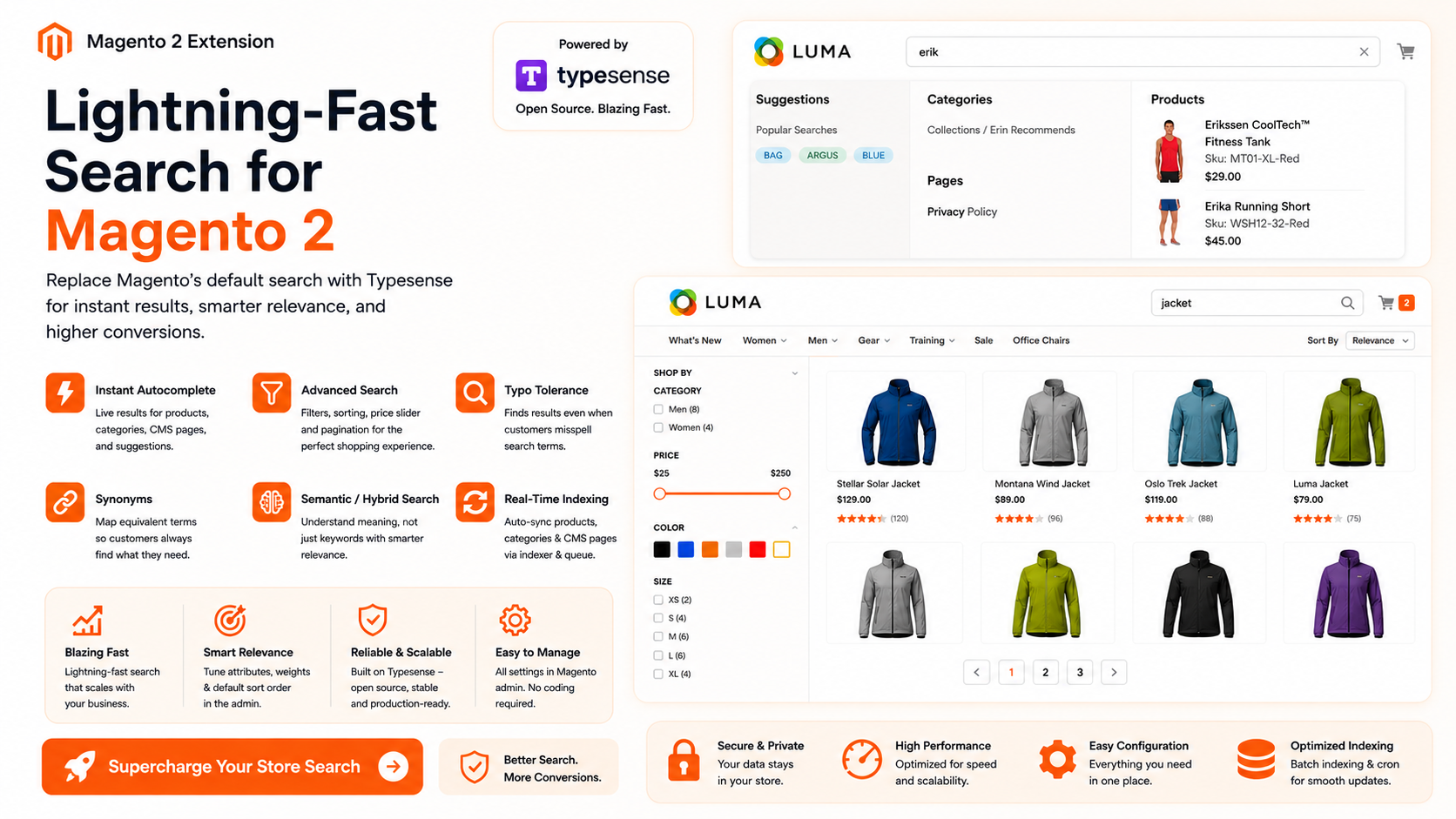
Ayasoftware TypesenseSearch replaces the default Magento search with Typesense, a fast open-source search engine built for instant search experiences.
Key Features
- Autocomplete — As customers type, instant results appear for products, categories, CMS pages, and search suggestions.
- Search Result Page — Replaces the default Magento search results page with a Typesense-powered instant search page featuring filters, sorting, price slider, and pagination.
- Category Page — Optionally replace the category listing page with Typesense-powered results.
- Indexing — Syncs your product catalog, categories, and CMS pages to Typesense automatically via Magento indexer and a real-time queue that updates on product changes.
- Relevance Tuning — Configure which attributes are searched, their weight, and default sort order from the Magento admin.
- Typo Tolerance — Finds results even when customers misspell search terms.
- Synonyms — Map equivalent terms so customers always find what they are looking for.
- Semantic / Hybrid Search — Optional AI-powered search that understands meaning, not just keywords.
- A/B Testing — Split visitors into control (standard ranking) and treatment (personalized ranking) with configurable traffic %. Results appear automatically in the analytics dashboard — side-by-side CTR, add-to-cart rate, conversion rate, and revenue per variant.
Admin Configuration
Full configuration from the Magento admin: API credentials, autocomplete display options, search filters, image settings, indexing queue/cron, and performance tuning (batch size).
Ayasoftware TypesenseSearch vs Algolia
Algolia bills on two metered dimensions — search requests and indexed records — and puts its AI behind higher-priced tiers. TypesenseSearch is a one-time license on search infrastructure you control, with no per-search metering and every feature included.
| Ayasoftware TypesenseSearch | Algolia | |
|---|---|---|
| Cost model | One-time $199 + your Typesense hosting. Predictable, flat. | Usage-based: pay per 1K search requests and per 1K records, every month. |
| Scales with traffic? | No. A viral day costs you nothing extra. | Yes. More searches = higher bill; overages billed at ~1.5–2× base rate. |
| Catalog size penalty | None. Index your whole catalog; cost is unchanged. | Records are a billed metric — large catalogs raise the monthly cost. |
| AI search & personalization | Included. Query rewriting, semantic search, and per-shopper personalization ship in the box. | Gated behind premium tiers; AI features can add 20–40% to contract value. |
| A/B testing | Built-in. Split visitors into control (standard ranking) and treatment (personalised ranking) with configurable traffic %. Results appear automatically in the analytics dashboard — side-by-side CTR, add-to-cart rate, conversion rate, and revenue per variant. No add-on, no extra cost. | Typically a separate line item, often $500–$2,000+/month. |
| Data ownership | Self-hosted or your own Typesense Cloud account. Your index, your server. | Hosted on Algolia's infrastructure. |
| Vendor lock-in | Open-source engine; full source code via Composer. Migrate freely. | Proprietary API; reindexing and frontend rewrites needed to leave. |
| Bring-your-own LLM key | Yes — Claude, OpenAI, or Gemini. You pay the provider directly at cost (est. $2–$20/mo). | AI priced into the tier; no cost-price passthrough. |
| Best fit | Stores wanting predictable cost, full control, and AI search without metered bills. | Teams wanting fully hosted search and comfortable with usage-based spend. |
Algolia pricing reflects its publicly published Grow/Grow Plus plans and is subject to change; verify current rates at algolia.com/pricing. TypesenseSearch total cost depends on your own Typesense hosting choice (self-hosted or Typesense Cloud).
Stack Requirements
Stack Requirements — ayasoftware/typesensesearch v1.4.0
Core Platform
| Dependency | Version | Notes |
|---|---|---|
| Magento Open Source / Adobe Commerce | 2.4.x | Tested on 2.4.6 – 2.4.9 |
| PHP | 8.1 – 8.3 | Required by Magento framework |
| Typesense Server | 0.25+ | Self-hosted or Typesense Cloud |
PHP Composer Dependencies
| Package | Version | Purpose |
|---|---|---|
magento/framework | ~102.0 or ~103.0 | Magento 2.4.x framework |
typesense/typesense-php | ^4.8 | PHP client for the Typesense API |
php-http/curl-client | ^2.3 | HTTP transport for the Typesense PHP client |
Installation Checklist
✅ Magento Open Source / Adobe Commerce 2.4.6 – 2.4.9
✅ PHP 8.1, 8.2, or 8.3
✅ Typesense Server 0.25+ (self-hosted or cloud)
✅ Composer dependencies installed:
- magento/framework
- typesense/typesense-php
- php-http/curl-client
Note: The extension has been tested with Magento 2.4.6 through 2.4.9 and requires access to a Typesense server instance for indexing and search operations.
Hyvä Theme Compatibility: This extension is currently not compatible with the Hyvä Theme. If you would like to use it on a Hyvä-based store, please reach out to us. We can provide a custom Hyvä-compatible version tailored to your requirements.
Changelog
1.5.0 June 15, 2026
New Features
A/B testing for personalised search
You can now run a controlled experiment to measure the impact of personalisation on your store's search performance. Visitors are split into two groups — a control group that sees standard Typesense ranking and a treatment group that receives personalised ranking based on their click, add-to-cart, and purchase history.
Assignment is deterministic: the same visitor always lands in the same group with no cookie or session storage required. Changing the experiment name in admin immediately reshuffles assignments, letting you start a fresh test without touching the database.
1.4.0 June 15, 2026
Improvements
Cache stampede prevention (ProfileBuilder)
The 15-minute TTL now has jitter (base 900s + a random 0–120s), so users who start sessions in the same window don't expire in lockstep and trigger the expensive GROUP BY rebuild all at once. On a cache miss, a lock ensures only one request per user rebuilds the profile — concurrent requests for the same key return empty immediately (personalization is a boost, not a hard requirement) rather than dog-piling the database. Late arrivals just pick up the warm cache on the next request.
Async analytics event writes
The bigger pressure point wasn't Redis at all — it was the synchronous MySQL INSERT on every click and search event, which hits connection limits well before the cache layer becomes a concern. That path is now asynchronous: the Track controller publishes the event to a message queue and the request returns as soon as it's enqueued, while a background consumer handles the actual insert. It reuses the existing queue infrastructure, so there are no new dependencies.
Net effect: read pressure is spread across time and deduplicated per user, and write pressure is decoupled from the request lifecycle entirely.
1.3.0 June 12, 2026
New Features
- Personalization Signals — Search results and category pages now boost products based on each shopper's individual behaviour. Products the shopper has clicked, added to cart, or purchased rank higher for that visitor using Typesense's
_eval()scoring formula. - Personalization works for both logged-in customers (scoped by customer ID) and guests (scoped by session cookie).
- Boost scores are computed server-side at page render and cached in Redis for 15 minutes per visitor — no per-request DB queries.
- Degrades gracefully: visitors with no history see the standard ranking unchanged.
Configuration
New Personalization group under Stores → Configuration → Ayasoftware → Typesense Search:
| Setting | Default | Description |
|---|---|---|
| Enable Personalization | No | Master toggle |
| History Window (days) | 30 | How many days of past events to include |
| Max Products to Boost | 20 | Cap on the number of products in the boost formula |
| Click Weight | 1 | Score assigned per product click |
| Add to Cart Weight | 3 | Score assigned per add-to-cart event |
| Purchase Weight | 5 | Score assigned per order event |
Database
- Added nullable
customeridcolumn (with index) toayasoftwaresearch_events. Runbin/magento setup:upgradeafter installing. - Analytics tracking now records
customer_idfor logged-in shoppers, enabling per-customer history that persists across sessions.
1.2.1 June 11, 2026
Ayasoftware TypesenseSearch — 1.2.1
Bug Fixes
- Fixed search results page not showing any filters
- Fixed price attribute not appearing in the filter sidebar
- Fixed price slider max value being permanently reduced after filtering
- Fixed price slider not resetting when the price filter chip is removed
- Fixed Enter key not applying the typed price range
Improvements
- Price slider now fires search only when the handle is released, not on every pixel drag
- Price handles show a live tooltip with the current value while dragging
- Price range input is now editable — type a range and press Enter to apply
- Improved price slider styling: larger handles, cleaner input, better spacing
- Search results default to 12 items per page with a 12 / 24 / 36 per-page selector
- Filters pre-configured out of the box: Category, Color, Size, Material, Gender, Price
1.2.0 June 10, 2026
New Features
Let AI Understand Search Intent
- Transform natural language searches into intelligent filters, categories, price ranges, brands, and attributes automatically.
Search Analytics & Recommendations
- Added a Magento Admin search analytics dashboard with store and 7/30/90-day filters.
- Tracks search impressions, product clicks, add-to-cart events, orders, conversion rates, and revenue attribution.
- Added actionable recommendations for zero-result searches, low click-through queries, and frequently searched terms that generate no orders.
- Added daily analytics aggregation for efficient reporting.
AI Search Improvements
- Added AI-powered natural-language filter parsing, including multilingual queries.
- Added provider selection for Claude, OpenAI, and Google Gemini.
- Added provider-specific API key and model configuration shared by query rewriting and AI filters.
Improvements
- Improved search result product rendering and interaction handling.
- Expanded product attribute configuration options.
- Updated the module and Composer package version to 1.2.0.
1.1.0 June 9, 2026
New Feature: AI-Powered Query Rewriting
This release introduces optional AI-powered search query rewriting using the Claude API. When enabled, search queries on the result page are automatically cleaned and expanded before being sent to Typesense, improving the quality of results for conversational, abbreviated, or misspelled queries.
Examples
- "cheap red running shoes" → removes filler, focuses on product terms
- "tee shirt xl" → expands abbreviations to "t-shirt xl"
- "do you have argus tank" → strips conversational phrasing to "argus tank"
- Fixes common misspellings automatically
How It Works
- Only fires on the search result page (not autocomplete) to avoid latency impact
- Rewritten queries are cached in Redis for 24 hours — repeated queries cost nothing
- If the API is unavailable or times out, search falls back to the original query silently
- When a query is rewritten, the result page shows "Showing results for: [rewritten query]" with an option to search the original term instead
Setup
Go to Stores → Configuration → Ayasoftware → Typesense Search → AI Search, enable query rewriting and enter your Claude API key (available at console.anthropic.com).
Estimated cost: $2–$20/month for most stores depending on search volume and cache hit rate. Uses Claude Haiku (cheapest model, 60 output tokens max).
1.0.9 June 9, 2026
- Initial release
Installation
Install via Composer after configuring your credentials. See your dashboard for your license key.
# 1. Add the repository to your project (one-time)
composer config repositories.ayasoftware composer https://www.ayasoftware.com/repo

# 2. Add your credentials to auth.json (one-time)
composer config --global http-basic.www.ayasoftware.com your@email.com YOUR_LICENSE_KEY

# 3. Require the extension
composer require ayasoftware/typesensesearch

# 4. Enable and upgrade
bin/magento module:enable $(bin/magento module:status --enabled | tail -n +3)
bin/magento setup:upgrade
bin/magento cache:clean